Showing posts with label Android. Show all posts

Sunday, November 13, 2011

Bloggeroid 1.9

After very long silence something new ;-) This time new version 1.9 of Bloggeroid.

Main difference between this version and previous should be visible when you will compare how it looked earlier:


and this how it looks now:


All screens was altered to be more readable and nicer.

Bloggeroid should looks nice on different screen sizes, starting from G1 (Android 1.6 and screen 3.2 inch), next Nexus S (Android 2.3.6 & screen 4 inches) and finally EEE Pad Transformer (Android 3.2.1 and screen 10.1 inch):


Additional changes are on post editor screen, button Publish was moved up, Reset was removed (now it is option in Menu), also near to tags you can see icon for working with localisation :-)
Nie są to może jakieś gigantyczne zmiany, ale przyznam, że mnie się podobają :-)

Download it using this link - Bloggeroid in Android Market.


Similar postsbeta
From Nexus 6 to Pixel XL :-)
I want my Android back!!!!
Android vs iOS
Bloggeroid
Bloggeroid 1.2 - let's make it simpler

Saturday, April 16, 2011

CallLoger ;-) Invigilate yourself ;-)

I like Android, it is a dream for programmer :-)

Some time ago I saw presentation prepared by some EU Parliament member who wanted to show how many cell operators know about you.
It was "movie" showing location of this person with information about calls and network usage.

I always knew that cell operators had such data, it is part of technology. Your internet provider also know Mac address of your computer or router. Cell operators know always where is your phone because in case of call they need to route transmission to proper BTS. So your phone login into BTS, or many BTSes (it depends from this which standard it is and so on)... So I wasn't shocked but I wonder "how difficult" will be to do something similar using only phone? ;-)

It looks that it isn't too difficult ;-)

First we need to handle incoming and outcoming calls. To do this we need to register ourselves for receiving some broadcasts: android.intent.action.PHONE_STATE and android.intent.action.NEW_OUTGOING_CALL.
How to do it I found here.

Next we need to create service which will obtain localisation, and will store into file info about time of call, direction (so incoming or outcoming), phone number, localisation (so latitude and longitude), accuracy of location, provider name (so GPS or Network, where Network describes both cell network and WiFi network), and if we will be able also "address". This is easy part, and most tricky thing for me was to wrote it in this way that we first will try to use GPS, and if we will not have location from GPS in 5 seconds we will try to use Network.

Last part is code for displaying results of our autoinvigilation ;-)

Here results on my Nexus S :-)

Here sample with result from Network (WiFi):
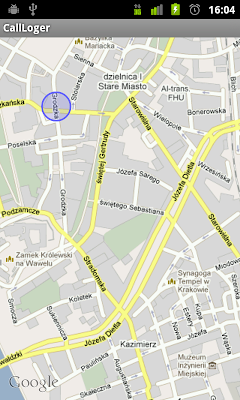


How you can see we have here rather good accuracy, about 60 meters (radius of circle shows accuracy). Btw. it is near KRK Google office ;-)

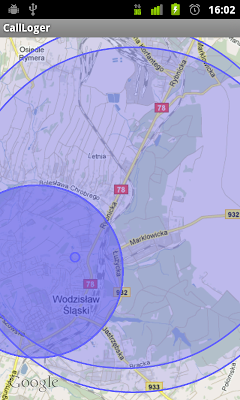
Here you can see more "global" ;-) view. Little circle near upper left corner is this what you saw on picture above:


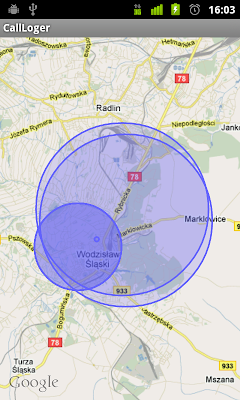
Here how looks my all connections to now, from the right you can see Kraków and my connections in Kraków (those you can see on pictures above):


And now how it looks when almost only GSM network is used ;-)


If you are interesting in seeing the code, you can find it here.
If you want APK file, you may find it here.

Isn't it cool that you can write something like this in less than 300-400 lines? :-)


Similar postsbeta
Know country behind apps on your phone....
Calculation of SSD life time in EEE PC
Chrome2Chrome - lets move browser tabs between computers ;-)
OOo2GD - surveys results
Programmers love to over complicate...

Tuesday, August 24, 2010

Bloggeroid 1.2 - let's make it simpler

New version of Bloggeroid, this time 1.2.

Because last version was rather difficult to use (I know it, because I - author has problems with using it ;-)) so I tried to make it easier to use.

Saving to SD card disappeared from Publishing screen and is now available on Post Editor in Menu. Editing exiting posts was renamed to Load exiting posts, and now after choosing it you need to choose if you want to load post from blog or from SD.
Also loading post content from blog or SD changes content of post in Post Editor (generally it should be only one Post Editor).
To avoid situations when you will loose your post because you will hit Back when it will not be needed, I added special "feature" which detects using of Back button and shows text about this that if you want to close you need to use Back button one more time (exactly in 2 seconds ;-)).

Hope those changes will make Bloggeroid more predicable and more useful.

Please share with your opinions, and feature requests :-)

Here is QRCode for Android Market :-)


Similar postsbeta
Bloggeroid 1.0 :-)
Bloggeroid 1.1 :-)
OOo2GD 2.3.0 - new documents, and autoupdate in work ;-)
Android vs iOS
OOo2GD 1.9.0, let's try to be seamless ;-)

Saturday, August 21, 2010

Bloggeroid 1.1 :-)

And here it is :-)
New version of Bloggeroid :-) This time with version number 1.1 :-)

Most important feature is saving posts to SD card, and reading posts from SD card.

Here you may see how blogging from Bloggeroid works:


And here how editing of existing posts works for posts from blogs, and SD card :-)


Here QRCode to Android Market :-)


If you will found any problems please send me information about it!


Similar postsbeta
Bloggeroid 1.2 - let's make it simpler
Bloggeroid 1.0 :-)
Just testing my new Android app for blogging on Blogger :-)
Bloggeroid
Biggest problem with WhatsApp, Telegram, Allo, Duo and so on

Monday, August 16, 2010

What sux in Android Market

Communication.

As a developer I would like to have possibility to communicate with users. If they have problems with my App I would like to be able to communicate with them. To ask questions.

Currently only way to communicate is to use description or comment, but in both cases you are limited in size (for description limit is set to 325 characters). And truly both those "channels" are intended to something other.


Similar postsbeta
4 steps of evolution of programmer ;-)
OOo2GD 2.4.0 - folders and HTTPS ;-)
Worflow - my biggest disapotiment of iOS
Calculation of SSD life time in EEE PC
My road to automation ;-)

Anybody with HTC Evo?

It seems that Bloggeroid have big problems with HTC Evo. It's something with images but I cannot say what.

So I'm searching for anybody with Evo who will be able to help me :-)
I will create special version or versions of Bloggeroid, and owner of HTC Evo who will want to help will check if problem still exists ;-)

So, anybody with HTC Evo here? :-)

[I'm not able to test it, first I don't have Evo, second Evo will even don't work in my country or even on my continent :-) we have here GSM/HSDPA not CDMA or EV-DO :-)]


Similar postsbeta
Borders, immigrants and so on
Bloggerid cannot post images....
Know country behind apps on your phone....
Bloggeroid
It's alive... still ;-)

Wednesday, August 11, 2010

Bloggeroid 1.0 :-)


I just published my first app to Android Market :-)
It's called Bloggeroid and it's simple Blogger client for Android.

To download it go to Android Market and search for Bloggeroid, or simply use this QR code:


Bloggeroid is simple. First screen which you will see is screen for writing post. You will choose where to publish when your post will be written :-)

Here list of things which you may do with Bloggeroid:
  • to write a blog post,
  • to add picture or pictures to post,
  • to decide where in post content those images should be placed,
  • to use simple "wikisyntax" (**bold** and __italic__),
  • to publish your posts on any of your Blogger blogs,
  • to use multiple Blogger accounts,
  • to publish your posts as draft,
  • to edit existing posts,
  • to share images from gallery and send those images to your blog.


This all in stable and simple way :-)
App takes after installation about 120KB, so it will make happy users of all older phones like G1.


Similar postsbeta
Bloggeroid
Bloggerid cannot post images....
Bloggeroid 1.2 - let's make it simpler
Just testing my new Android app for blogging on Blogger :-)
Bloggeroid 1.9

Wednesday, July 28, 2010

Bloggeroid

I'm currently working on some small Android project called Bloggeroid.

Bloggeroid is small and simple Blogger client. Currently it can only publish posts with multiple images to any blog connected to any Google Account (of course you can always send post without images ;-)).

Currently it has only about 34kB, so all G1 users should be happy ;-)

In comparison to more than 3MB of other solutions available on Android Market it isn't bad result ;-)

Anybody interested? ;-)

If you are interested here is link to APK file :-)

And movie showing how it works [this was done with older version, texts in presentation are in Polish ;-)]